- Home Page /
- Electronics /
- Computer Accessories /
- Computer Data Storage Devices /
- Network Attached Storage /
- Devices /
- Synology DS425+ Private Cloud Media Server - ...
0 ratings





Item #:
145757518
Synology DS425+ Private Cloud Media Server - Stream, Back Up & Share Files (4-Bay Diskless NAS)
Item #:
145757518
BTN 70751
Price Details
Excluding Shipping & Custom charges ( Shipping and custom charges will be calculated on checkout )
*All items will import from US
In stock
 Imported from USA store
QTY:
Only 3 items left in stock.
Order now and get it around Tuesday, August 11
Secured transaction
Ubuy works hard to protect your security and privacy. Our advanced payment security system ensures confidentiality by encrypting your information during transmission using AES (Advanced Encryption Standards) and SSL (Secure Socket Layer) protocols. Your payment details are 100% secure as we do not share your payment details with third party sellers.
Our Top Logistics Partners


Store up to 80 TB of data in one place, maintain 100% data ownership, and enjoy multi-platform access.

Fast
Shipping

Free
Return*

Secure Packaging

100% Original Products

PCI DSS Compliance

ISO 27001 Certified


Note: Step Down Voltage Transformer required for using electronics products of US store (110-120). Recommended power converters Buy Now.


What Stands Out
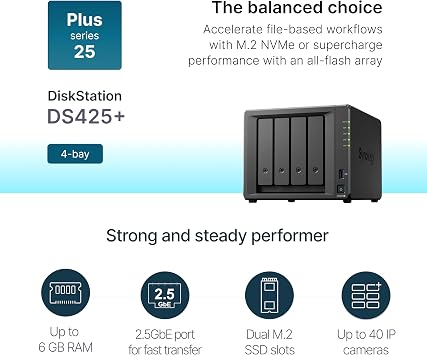
4-Bay Expansion
The Synology DS425+ offers four drive bays, allowing extensive storage expansion for users, accommodating various RAID configurations to enhance data protection and retrieval speeds.
Robust Performance
Equipped with a powerful CPU and ample RAM, the DS425+ ensures seamless multitasking, enabling smooth operation for file sharing, backups, and multimedia streaming without performance lags.
Intuitive Interface
Synology's DiskStation Manager provides a user-friendly interface, simplifying configuration and management of storage solutions, making it suitable for both beginners and seasoned tech enthusiasts.
Product Details
- Team Productivity & Media Hub - Share large files and stream media across your office with 278 MB/s speeds; support concurrent access from 10+ users
- Centralized Repository - Store company documents, client files and media assets with granular access controls and audit logs
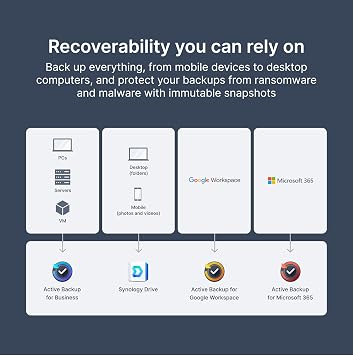
- Multi-Layered Data Protection - Combine RAID redundancy, automated backups and snapshot technology to prevent data loss from any cause
- Professional Surveillance System - Monitor home or business with support for 30 IP cameras, motion detection and secure remote access
| Brand | Synology |
| Manufacturer | Synology |
| UPC | 846504005994 |
| Unit Count | 1 Count |
| Model Number | DS425+ |
| Mfr Part Number | DS425+ |
| Item Dimensions D x W x H | 8.78"D x 7.83"W x 6.54"H (22.3 x 19.9 x 16.6 cm) |
| Size | 166 mm x 199 mm x 223 mm |
| Item Weight | 2180 g |
| Storage Volume | 80 TB |
| Compatible Devices | Android, Desktop, Laptop, Server, iPhone |
| Mounting Type | Tabletop |
| Color | Black |
| Enclosure Material | Metal, Plastic |
| Product Dimensions (L x W x H) | 8.78"D x 7.83"W x 6.54"H (22.3 x 19.9 x 16.6 cm) |
| Material | Metal, Plastic |
Who Should Buy?

-
Small Businesses
Ideal for small businesses requiring centralized data storage and file sharing among multiple users securely.
-
Home Media Enthusiasts
Perfect for users wanting to store and stream large media libraries across various devices in their home.
-
Tech Savvy Users
Best suited for users looking to customize their storage solutions with applications and services from Synology's ecosystem.

-
Casual Users
Not ideal for users who require simple plug-and-play solutions without the need for complex setup and management.
Product Description
Have any Query? Chat with us
Customer Questions & Answers
-
Question:
What are the main features of the Synology 4-Bay DiskStation DS425+?
Answer: The Synology 4-Bay DiskStation DS425+ boasts impressive features, including robust storage management, support for various RAID configurations, and powerful data backup solutions. It is powered by an efficient processor, enabling smooth multitasking and quick data access. With a user-friendly interface and a wide range of compatible applications, users can seamlessly set up their network storage for media streaming, file sharing, and cloud backup. This makes it ideal for small businesses and home users looking to enhance data security and accessibility. -
Question:
Can the Synology DS425+ be used for media streaming?
Answer: Yes, the Synology DS425+ is designed for media streaming capabilities. The device supports a vast array of multimedia formats and can act as a media server using applications like Synology Video Station and Plex. This allows you to organize and stream your videos, music, and photos directly to compatible devices, ensuring an enjoyable viewing experience. It's particularly useful for families wanting to access digital content from various devices within their home network. -
Question:
What types of hard drives are compatible with the DS425+?
Answer: The Synology DS425+ supports a wide range of SATA hard drives and SSDs, allowing users to customize their storage needs. You can use 3.5” or 2.5” drives, mixing HDDs and SSDs for improved performance or cost-effectiveness. This flexibility is crucial for users with different storage requirements, whether they need vast amounts of space for data archiving or speed for active applications. It's ideal for users looking to build a tailored storage solution based on their specific needs. -
Question:
Is the Synology DS425+ suitable for business environments?
Answer: Absolutely, the Synology DS425+ is well-suited for business environments. Its robust performance, extensive data management features, and ability to handle multiple users simultaneously make it an excellent choice for small to medium-sized businesses. Functions like centralized file storage, automated backups, and collaboration tools help streamline workflow and enhance productivity, making it a practical solution for teams requiring reliable access to shared resources. -
Question:
What kind of backup solutions does the DS425+ offer?
Answer: The Synology DS425+ provides a variety of backup solutions, including local, remote, and cloud options. Users can utilize Synology Drive for file backups, Synology Hyper Backup for comprehensive data protection, or even third-party cloud backup services for added reliability. This versatility helps users establish a multi-layered backup strategy that enhances data security against accidental loss or disasters, making it essential for both personal and business use. -
Question:
How does the DS425+ ensure data security?
Answer: Data security is a top priority for the Synology DS425+. It employs advanced security protocols like SSL encryption, 2-step verification, and comprehensive access controls to ensure only authorized users can access sensitive information. Additionally, with features like automated backups and snapshots, users can recover data in case of accidental deletion or ransomware attacks. This robust security framework is vital for users who store important personal or business-related files. -
Question:
Can I access my data remotely with the DS425+?
Answer: Yes, remote access is one of the key advantages of the Synology DS425+. Users can securely access their files from anywhere using Synology's mobile apps or web interface. With self-hosted cloud services, data can be accessed and managed without relying on third-party cloud providers. This is particularly beneficial for users who travel frequently or need to collaborate with team members or family members from different locations. -
Question:
What applications can I install on the DS425+?
Answer: The Synology DS425+ is compatible with a vast ecosystem of applications available through the Synology Package Center, covering various needs from multimedia management to productivity and IT management. Users can install tools for surveillance, web hosting, file synchronization, and even virtual machine management. This extensive application support enables users to expand the functionality of their DiskStation beyond mere storage, transforming it into a comprehensive digital hub. -
Question:
How is the energy efficiency of the Synology DS425+?
Answer: The Synology DS425+ is designed with energy efficiency in mind. It features power-saving modes and options for scheduling hard drive hibernation, significantly reducing power consumption during idle times. This is especially important for environmentally conscious users or businesses looking to lower operational costs. The efficient design helps users maintain a balance between performance and energy savings, ultimately contributing to lower electricity bills. -
Question:
Where can I buy Synology 4-Bay DiskStation DS425+ (Diskless) in Bhutan?
Answer: You can purchase the Synology 4-Bay DiskStation DS425+ (Diskless) through Ubuy in Bhutan. Ubuy offers a reliable platform where you can find this product along with various other tech items. Their user-friendly interface makes it easy to navigate and explore your options.
Synology Devices DS425+ Editorial Review


No editorial reviews found
Customer Reviews & Ratings
87 customers ratings
-
5 Star
81%
-
4 Star
9%
-
3 Star
2%
-
2 Star
2%
-
1 Star
6%
Review this product
Share your thoughts with other customers
Platform Trust & Buyer Confidence

MA
Mohammad
Verified buyer
“Excellent quality and original too,when ubuy send original things I will appreciate that ,I very satisfied thank you”
23 July 2026 · via Trustpilot
CK
Chitra
Verified buyer
“The order and delivery progress was communicated very well. Package arrived within the estimated time. Products arrived as expected in good condition.”
22-Jul-26 · via Trustpilot
K
kund
Verified buyer
“Good supply of products. Safe payment methods, and shipment worldwide! Genuine products.”
23-Jul-26 · via Trustpilot
OO
Onesi
Verified buyer
“Was my first time buying a product from Ubuy, but I found it so helpful. This is reliable. Gonna place a new order!”
22 July 2026 · via Trustpilot
SJ
SAO JOHN
Verified buyer
“Ubuy is a great online platform to buy stuff. Reliable, fast delivery time and great value for money. I've been using Ubuy online shopping platform for three years now and will continue to do so.”
23 July 2026 · via Trustpilot
Secure Checkout
Global Delivery
Easy Returns
Genuine Products
Product Price History
Important information
- Limitations : For products shipped internationally, please note that any manufacturer warranty may not be valid; manufacturer service options may not be available; product manuals, instructions, and safety warnings may not be in destination country languages; the products (and accompanying materials) may not be designed in accordance with destination country standards, specifications, and labeling requirements; and the products may not conform to destination country voltage and other electrical standards (requiring use of an adapter or converter if appropriate). The recipient is responsible for assuring that the product can be lawfully imported to the destination country. When ordering from Ubuy or its affiliates, the recipient is the importer of record and must comply with all laws and regulations of the destination country.
- Not all the products listed on Ubuy are for sale, as Ubuy is a global search engine. Products are subject to export/trade regulations.
BTN 70751
Order now and get it around Tuesday, August 11
This item is not restrict in my country.(Please click on above link if this item is not restrict in your country, So our team will review and allow.)
QTY:
Only 3 items left in stock.
Secured transaction
PCI DSS compliant and ISO 27001:2022 certified, with encrypted payments and full buyer protection on every order.
Our Top Logistics Partners
Fastest cross-border delivery
Features & Benefits
- Supports up to 80 TB of data storage.
- 100% data ownership for peace of mind.
- Multi-platform access for convenience.
- Fast data transfers with up to 278/281 MB/s throughput.
- Built-in file and photo management tools.
- Robust data protection and surveillance solutions.
Ubuy Assurance
Experience worry-free shopping with 100% original products, PCI DSS-compliant payment security, ISO 27001-certified data protection, the fastest cross-border delivery, free returns *, and secure packaging on every order.